
Introduction
In today’s world of apps and websites, so much happens behind the scenes that people don’t realize. Every time you check the weather on your phone, watch a YouTube video, or log into a site using Google or Facebook, your device is quietly talking to other computers. APIs are the secret language and toolkit that make this possible. They are extremely important in modern technology because they allow different programs to work together smoothly without needing to know all the details of each other. In fact, APIs are everywhere – from the apps on your smartphone to the cloud services running businesses. Understanding APIs helps us see how the digital world is connected and why many tech jobs require knowing how to use them.
To make it simple, think of a common real-life example: going to a restaurant. You walk into a restaurant, look at the menu, and decide what to order. You tell the waiter what you want. The kitchen (behind the scenes) prepares your food. The waiter brings your meal to your table. You don’t need to know how the kitchen cooks the food or how the ingredients are stored. You just give your order to the waiter and get your food.
In this analogy, you are the user or the client, the waiter is the API, and the kitchen is the service or system. The menu is like the list of things the service can do or provide. This familiar scene is exactly how an API works in tech: you make a request (order), the API (waiter) passes it to a system (kitchen) that does the work, and then the API brings back the response (your food). This real-life analogy shows why APIs are so useful: they hide complex details and let you get what you need without fuss. In this article, we’ll break down APIs in very simple terms and use plenty of everyday examples so you can really understand what they are and why they matter.
Basic Definition (Very Simple)
An API stands for Application Programming Interface. That sounds technical, but it just means a set of rules or a messenger that lets one program talk to another program. You can think of an API like a waiter, a remote control, or a translator—basically, something that helps pass your request along and get a response back.
For example, imagine you have a weather app on your phone. The app does not collect weather data itself. Instead, it asks a weather service for the data. It does this using an API. You (the app user) might just see a button that says “Get Weather,” but behind the scenes, the app uses the API to send a request over the internet like “Hey, what’s the weather in my city?” The weather service receives that request, finds the answer, and sends it back. The app then shows you the temperature. You never see all the technical details; you just see the final weather report.
Here are some easy examples and analogies to make this clearer:
- Waiter at a Restaurant: As we said, a waiter takes your food order to the kitchen and brings back your meal. The menu lists what you can order. In an API, the “menu” is like a list of functions or data the service offers. You pick what you want, the API (waiter) takes your order (request), and returns the answer (response).
- TV Remote Control: Think of a TV remote as an API. Each button on the remote is a command (like changing the channel or raising the volume). When you press a button, the remote sends a signal to the TV saying what to do. You don’t need to know how the TV does it, just that pressing “Volume Up” makes the sound louder. Similarly, using an API means calling a command or function without worrying about how it’s implemented.
- Dictionary or Translator: Imagine you speak English and your friend speaks Spanish. A translator helps you talk to each other. The translator listens to you, translates your sentence, and says it to your friend in Spanish. The translator also takes your friend’s response and tells you in English. An API translates one program’s request into something another program can understand, and back again.
- Menu of a Hotel (Room Service): A room service menu lets you order food to your room. You look at the menu (which lists dishes and prices), pick what you want, and call the hotel kitchen. The kitchen sends your meal to your room. You don’t need to go to the kitchen yourself. In a similar way, an API is like the room service menu for software: it tells you what the system offers and lets you get it delivered without doing all the work yourself.
In summary, a very basic way to think of an API is “a messenger that takes your request, tells a system what you want, and then gives you the system’s response.” It makes sure the communication is smooth and follows certain rules, so both sides understand each other.
Core Concepts (Step-by-Step)
To really grasp what an API does, let’s break down its important ideas step by step:
- Interface Between Programs: An API acts like a bridge or interface between two pieces of software. It defines exactly how a request should be made and how the response will look. Just like a language dictionary tells you how words correspond between two languages, an API defines how one program talks to another. For example, a mobile app can use an API to talk to a web server. The API specifies the exact format of messages they exchange, so there’s no confusion.
- Requests and Responses: At the heart of an API are requests (asking for something) and responses (getting something back). Think of it as a question-and-answer pattern. A program (the client) sends a request to the API, asking for data or telling it to do something. The API passes that request to the underlying system, which processes it and sends back a response. For example, an app might request, “Give me the latest news,” and the API responds with the news data. Each request usually has three parts:
- Action/Method: What you want to do (like “get data” or “post data”).
- Target/Endpoint: Where or what you are talking to (like “get weather” or “create a user account”).
- Data (if needed): Any additional info needed to complete the request (like a city name for weather, or user details to create an account).
The response then contains the result of that action (like the weather info or a confirmation message).
- Endpoints: An endpoint is a specific address (or a function name) where the API listens for requests. You can think of endpoints as the doors you knock on to get certain services. For instance, a weather service API might have an endpoint like
/getWeatherwhere you send a location, and it returns the forecast. Each endpoint usually does one particular thing. Using the restaurant analogy, an endpoint is like a specific dish on the menu. You choose a dish (endpoint) when you place your order. - Data Formats (JSON, XML): When an API sends back data, it needs to be in a format that both computers understand easily. Common formats are JSON (JavaScript Object Notation) and XML. These are just ways to organize the data as text. For example, if you ask for weather, the API might respond with text that looks like
{ "temperature": 72, "condition": "Sunny" }. That’s JSON. It’s human-readable but also easy for programs to parse. Think of it as the neatly wrapped package containing your food: the content is easy to read and use. - HTTP and Web APIs: Many APIs on the internet use the HTTP protocol (the same one your web browser uses to load websites). You might hear about “REST APIs,” which are just a common style of web API. Basically, it means you use web addresses (URLs) and HTTP methods (like GET for reading data, POST for sending data) to communicate. For example, visiting
https://api.example.com/users/123might get user info. This is like dialing a phone number (the URL) to reach a specific person (the service). - Authentication and Keys: Some APIs are open for anyone to use, but many require a kind of login or key so only authorized users can access them. This is called authentication. It’s like having a special password or ticket. For example, a map API might require a secret key so that only apps with permission can use it. If you don’t have the key or credentials, the API will refuse your request. This keeps services secure, like how a bouncer checks a guest list at a club’s door.
- Public vs Private APIs: There are public APIs (or open APIs) and private APIs. Public APIs are available to anyone; companies publish them so developers can build apps on top of their services. For example, Twitter or Google often have public APIs. Private APIs are only for internal use (within one company or specific partners) and are not shared publicly. Think of public APIs as park entrances anyone can use, and private APIs as doors inside a company that only employees can open. Many exam questions might ask about the difference: just remember public means “open to developers,” private means “only used internally.”
- API Documentation: Good APIs come with documentation, which is like an instruction manual or menu. It lists all the endpoints, what each one does, what parameters it needs, and what it will return. Reading documentation is essential to know how to use an API. For example, the docs will tell you exactly how to format your request and what response to expect. This is like checking the menu and recipes to know exactly how to order and what ingredients will arrive.
These core concepts form the foundation of how APIs work. You might not need to know every detail when using an API, but it helps to understand that it’s a rulebook or messenger system for different software programs to communicate safely and efficiently.
Visual Explanation (Text-Based Diagrams)
Sometimes seeing a picture (even in ASCII art) helps understand. Below are simple diagrams to show how an API request and response flow works. Imagine arrows showing the path of a request and the path back with the response.
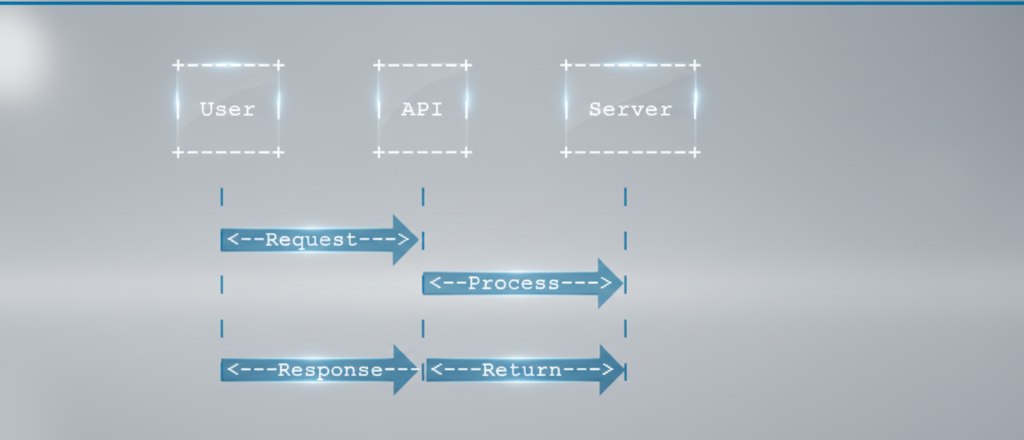
In the diagram above, User (which could be your app or program) sends a Request to the API. The API passes the request along to the Server (the behind-the-scenes system). The server then processes the request (maybe fetching data or doing a calculation) and sends a Response back to the API, which then returns it to the User. This loop shows how communication travels from the user to the system and back, all handled by the API in the middle.
Here’s the restaurant analogy drawn out the same way:
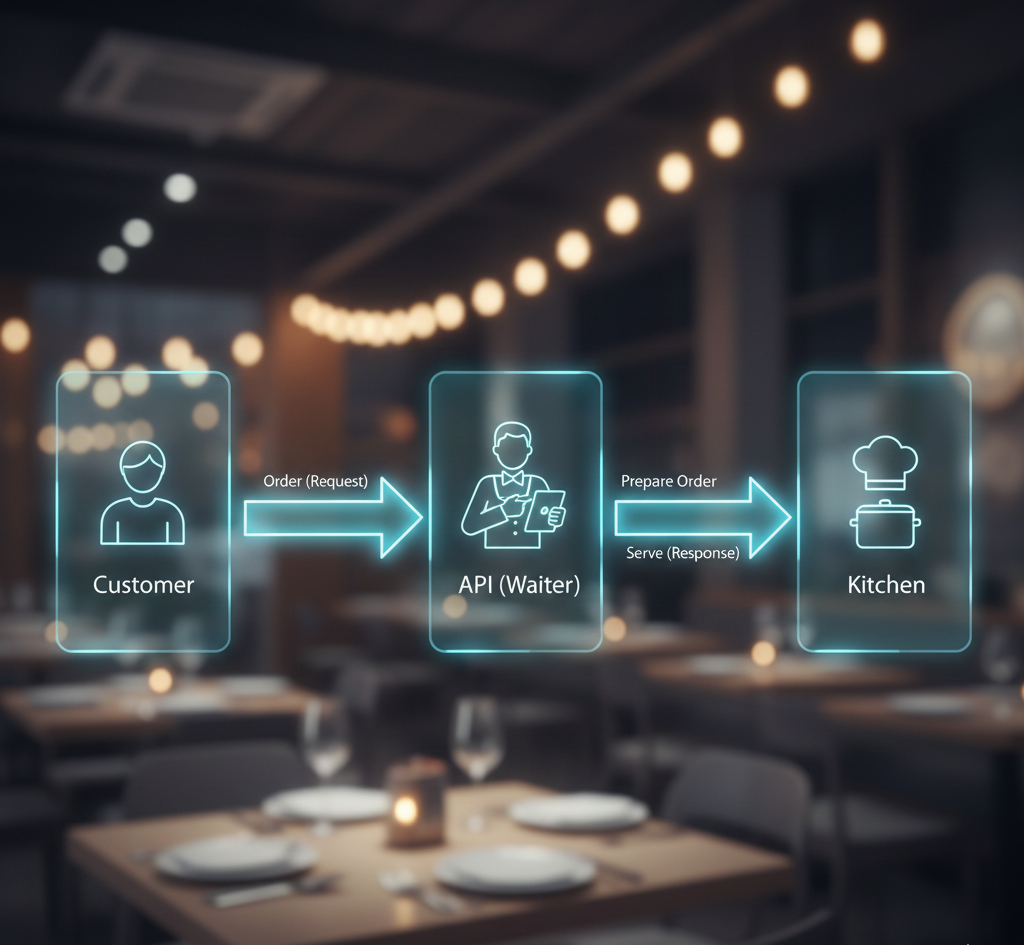
In this second diagram, the Customer (you) makes an Order which goes to the API (Waiter). The waiter then tells the Kitchen what to prepare. Once the Kitchen is done, it gives Food (Response) to the waiter, and the waiter Serves it back to the Customer. This shows exactly how your request and the returned result move through the system.
These text diagrams illustrate the same process in different words. The key idea is that an API sits in the middle, carrying orders (requests) to the server or service, and bringing back the results (responses) to whoever asked.
Real-Life Examples
APIs are not just a computer science concept; they power many things you do every day. Here are some common examples:
- Weather Apps: When you open a weather app on your phone, the app doesn’t create weather information by itself. It sends a request through an API to a weather data service (often on the internet). For example, your app might ask, “What’s the weather in London right now?” The weather service API receives this request, finds the data (maybe from satellites and sensors), and sends back a response with the current temperature and conditions. The app then shows you “Sunny, 25°C”. You just clicked a button, but behind the scenes the API made it possible.
- Social Media Sharing: If you’ve ever used a “Share on Facebook” or “Post to Instagram” button inside another app, you used an API. For instance, a photo app might use Instagram’s API to upload your picture directly to your feed. Your app sends the photo and description to the Instagram API, which then creates the post on your profile. You don’t see the Instagram website at all; the API handles it. Similarly, when you log into a site using Google or Facebook, those sites provide an API to authenticate your login. You give permission once, and the site uses the API to verify your identity.
- Online Shopping and Payments: When you buy something online and pay with PayPal or Stripe, an API is at work. The website you’re on sends your payment details to the PayPal or Stripe API. That service then communicates with your bank or credit card company (using another API) to authorize and complete the payment. Finally, it sends a response back to the shopping site confirming the payment was successful. All of this happens in seconds. You just clicked “Pay,” but APIs between the shopping site, payment service, and bank made it all happen seamlessly.
- Maps and Navigation: Most apps that provide maps or directions (like Google Maps, Uber, Lyft) use map APIs. For example, a delivery app might show you a map of your current location and your destination. That app’s code calls the Google Maps API (or another maps service) to get map images and driving directions. The API returns the map tiles and route info, which the app displays. If the app gives you live traffic updates, it’s also getting those through the API.
- Travel and Booking: When you search for flights or hotels online, that travel site uses several APIs behind the scenes. One API might check airline databases for flight availability, another might check hotel listings, and another may handle payment. For example, booking.com uses APIs to fetch available rooms from hotels’ systems instantly. You see “5 rooms left at $80” because the API confirmed it with the hotel database.
- Voice Assistants: When you ask Siri, Alexa, or Google Assistant a question (“What’s the capital of France?”), your voice command is turned into a text request. That request is sent to an API that processes natural language and fetches an answer. The API might talk to a search engine or a knowledge database. Then it sends the answer back, and the assistant speaks it to you. All those steps use APIs.
- Student Projects: Suppose a student wants to create a school project that shows pictures of space. NASA has public APIs that give images and data about planets, the International Space Station, and more. The student can write a simple program that requests an image of Mars from the NASA API and displays it. The student never needs to build a space camera; they just use NASA’s API.
These examples show that APIs are like hidden helpers in many daily situations. They make it easy for apps and websites to use services and data from other sources. You interact with some part of the program (like a button or form), and the API does the work behind the scenes to get the information or perform the action.
Practical Use Cases
Let’s look at where and how APIs are used in practice, both in industry and for students learning technology:
- Web and Mobile Development: Modern web and mobile apps almost always use APIs. Front-end developers create the part of the app you see (like buttons and forms), and they use APIs to communicate with back-end servers. For example, a front-end web page might call an API to get user profiles or post a comment. Mobile apps use APIs to sync data, log in users, retrieve updates, and more. Essentially, if you develop apps for the web or phone, you will use APIs to make your app communicate with servers and databases.
- Data Science and Machine Learning: Data scientists and AI researchers often use APIs to gather data. Instead of scraping a website or manually collecting information, they call an API to get structured data. For instance, if a student is analyzing stock market trends, they can use a finance API to get historical stock prices. Many AI services (like speech recognition, image analysis, or language translation) are offered through APIs. Rather than building a voice recognition system from scratch, a developer can use Google’s or IBM’s speech-to-text API to convert speech to text in their project.
- IoT (Internet of Things) and Smart Devices: Many smart home devices and Internet of Things gadgets use APIs to talk to each other or to cloud services. For example, a smart thermostat might use the weather API to adjust the temperature before you come home. Or a fitness wearable might use a health API to sync data with your smartphone. In industry, IoT devices send data through APIs to monitoring systems or dashboards.
- Cloud Services and Microservices: In big companies, applications are often broken into smaller pieces called microservices. Each microservice might have its own API. For example, one service might handle user accounts, another handles products, another handles payments. They all communicate through APIs. This makes it easy to scale and update parts of the system independently. If you work in cloud computing or enterprise IT, knowing how to design and integrate APIs is crucial.
- Automation and Scripting: Developers and even non-developers use APIs to automate tasks. For example, you could write a small script to call an API that sends you the daily weather report or stock prices, and then email it to yourself. Or a teacher might use an API to automatically pull the latest posts from a blog and display them on a class website. Even services like IFTTT (If This Then That) allow connecting different web apps together using their APIs.
- Research and Academics: In academics, students or researchers may use APIs to access large datasets. For instance, many universities provide an API for students to get their own grades or course info. Public organizations publish APIs for things like census data, scientific measurements, or traffic patterns. A student working on a data analysis project can use these APIs to fetch real-world data without manual downloading.
- Integration with AI Tools: As a special example relevant to tech today, many AI tools and platforms provide APIs. For instance, OpenAI’s GPT models can be accessed through an API. If you’re building a chatbot or a writing assistant, you’d call the GPT API with your prompt, and it returns a generated response. Other AI services (like Google Vision, IBM Watson, etc.) use APIs to provide image recognition, language translation, and more. This means that learning APIs opens up access to powerful AI capabilities for projects.
In each of these use cases, the core idea is the same: an API allows one system to use the features or data of another system without having to understand its inner workings. It’s a way to mix and match services like building blocks. Whether you are a developer in a company or a student working on a project, you’ll often integrate APIs to add functionality quickly and efficiently.
📘 Exam Focus
Short Definitions:
- API (Application Programming Interface): A set of rules and tools that allows different software applications to communicate.
- Endpoint: A specific URL or function in an API where a request can be sent.
- Request & Response: A request is a message sent to the API to get something or perform an action. A response is the message returned by the API with the result.
- JSON (JavaScript Object Notation): A common text format for sending data in APIs (it looks like readable text with braces and quotes).
- Authentication: A way to verify identity (like API keys or tokens) to ensure only authorized users can use the API.
Common Exam Questions:
- What is an API? Explain it in simple terms and give an example. (Answer: An API is like a waiter taking orders to the kitchen in a restaurant. It lets programs request services from other programs.)
- Give a real-life analogy of an API. (Answer: Waiter in a restaurant, TV remote, or translator/dictionary between languages.)
- Why are APIs important in modern technology? (Answer: They allow different apps and services to communicate and share data, making development faster and services more integrated.)
- What does API stand for? (Answer: Application Programming Interface.)
- What is the difference between a public API and a private API? (Answer: A public API is open for any developer to use (often requiring registration), while a private API is only for a specific organization’s internal use.)
- Name a common data format used by APIs. (Answer: JSON is very common, as is XML.)
- How does an API relate to web requests? (Answer: Many APIs use HTTP requests (like GET, POST) to interact. You send an HTTP request to an API endpoint and get data in return.)
Key Points to Memorize:
- API = Messenger: Remember the restaurant analogy to recall how an API works.
- Separate Code: With APIs, you don’t need to know how the other program is written; just its interface.
- Time-Saving: Using APIs means developers don’t rewrite code for common tasks (like payments or maps); they reuse existing services.
- Security: APIs often use keys or tokens; this keeps data safe and tracks who is using the service.
- Standards: Web APIs usually follow common patterns (REST, HTTP, JSON); knowing these terms can help on exams.
- Examples: Be ready to cite simple examples (weather app, social login, online shopping payment) to illustrate API usage.
Differences (if applicable):
- API vs User Interface (UI): A UI is what humans use to interact with a program (buttons, screens). An API is an interface for programs to interact with other programs, not meant for humans to use directly.
- API vs Web Service: A web service is any service available over the internet. A web API is a type of web service that specifically follows certain standards. (In simple terms, most web services are APIs, but not all APIs are web-based.)
- GET vs POST: On exams, you might need to know that GET requests are used to read data from an API, while POST requests are used to send or create data. (This is basic HTTP knowledge when discussing web APIs.)
- Open API vs Closed API: Open (Public) APIs can be used by anyone (like Google Maps API). Closed (Private) APIs are only for in-house use or specific partners.
This box highlights the exam-relevant facts: definitions, likely questions, key terms, and differences you should study and remember. Visualize the waiter analogy and these bullet points for quick recall during tests.
Common Misconceptions
When learning about APIs, beginners often get some ideas mixed up. Let’s clear up a few:
- APIs Are Only for Programmers: Many people think APIs are something only coders care about. In reality, even if you aren’t coding, you benefit from APIs daily (like using apps). Understanding APIs can help non-technical people too, because it teaches how apps integrate services (helpful for project managers, product designers, etc.). The truth is that APIs power many user-friendly products, so it’s not just for techies.
- API Is the Same as an App or Program: Some think an API is a separate application. Actually, an API is not a standalone program you run; it’s a set of rules or tools. It could be part of a program or a service, but on its own, it’s like a menu or instruction sheet, not a whole restaurant.
- APIs Always Show a User Interface: Confusingly, some might expect an API to give them a visible screen or GUI. Instead, APIs work behind the scenes. They return data for programs to use, not something humans directly click on. For example, a weather API won’t show a weather web page; it sends data like “72 degrees” to your app.
- Public APIs Are Unsafe: It might seem like any open API should be avoided for security reasons. But public APIs are often well-protected and used by many. Companies secure them with keys and encryption. The idea is that even public APIs have layers of security to prevent misuse. So it’s not true that open APIs are automatically dangerous; they require safe handling, just like any internet service.
- Using an API is Always Complex Coding: Beginners might worry that using an API means learning complex programming. While coding is often involved, many APIs are straightforward to use. There are tools and libraries that make calling APIs simple. Some even allow no-code usage. Of course, learning basics of how to send a request (like pressing a button in a browser or writing a few lines of code) is helpful, but it’s not insurmountably difficult.
- APIs Create Data Out of Nothing: An API itself doesn’t invent information. It provides access to data or services that already exist. For example, a news API doesn’t write news; it just gives you articles from news sites. Remember that an API is a messenger to data sources, not a creator of content.
- All APIs Are the Same: While many APIs work similarly, they can differ in how they look and operate. Some use JSON data, others might use XML. Some require keys, others don’t. Each API has its own “menu” (documentation). Don’t assume one API works exactly like another.
By understanding these misconceptions, you can avoid confusion. Always remember an API is simply a helper that follows rules to connect software, and it doesn’t replace the hard work of the underlying system.
Advantages & Limitations
| Advantages | Limitations |
|---|---|
| Reusability: Save time by using existing services (e.g., using a Maps API instead of building your own map). | Security Needs: APIs must be secured (with keys, authentication), which requires extra care. |
| Efficiency: Rapid development because developers don’t reinvent common features. | External Dependency: If the API provider has downtime or changes the API, your app could break. |
| Interoperability: Different systems (even in different programming languages) can work together. | Rate Limits: Many APIs limit how often you can call them, which can slow down heavy usage. |
| Scalability: Easy to grow; you can add more API-powered features without large changes. | Versioning Issues: When an API updates, old versions may stop working, forcing updates to your code. |
| Abstraction: Users don’t need to see complex details; the API hides complexity. | Performance: Calling remote APIs can be slower than doing tasks locally because of network delays. |
| Innovation: Combines different technologies (e.g. integrating payment, maps, AI) to create new apps. | Learning Curve: Beginners need to learn how to format requests and handle responses correctly. |
This table summarizes the pros and cons of using APIs. On the left are the benefits – for instance, APIs let you reuse functionality and connect different systems easily. On the right are the challenges – such as needing to secure APIs properly and depending on third-party services. Understanding both helps you appreciate why APIs are powerful but also what you need to watch out for when using them.
Beginner Learning Path
If you’re new to APIs and want to get a strong understanding (especially before an exam or a project), here are step-by-step suggestions:
- Learn the Basics of Web and Programming: Make sure you understand simple concepts like what a server is, how the internet works, and basic programming ideas (like functions and data). You don’t need to be an expert coder, but knowing how a web page or app usually gets its data will help.
- Read Introductory Guides: Find beginner-friendly tutorials or videos about APIs. Since we can’t link here, look for terms like “API introduction” or “APIs for beginners” online. Focus on explanations that use everyday analogies (like this article!). This will cement the idea of requests and responses.
- Experiment with a Simple API: Use a tool like your web browser or a free app to try calling an API. For example, open a weather API in your browser by going to a URL like
api.weather.com/current?city=London(the actual URL will depend on which weather API you choose, some may require a free key). See the result it returns (likely in JSON). This hands-on step shows you what a real API call looks like. There are public APIs for jokes, trivia, or space data that anyone can try. - Use a Learning Platform or Code: If you code even a little (like Python or JavaScript), try writing a short script that calls an API. For instance, in Python you can use
requests.get("api.url")to fetch data. Alternatively, free online coding environments or API explorers (like Postman’s free version) let you send requests without writing code. The goal is to see how you send a request and get a response. - Read API Documentation: Pick an easy public API (maybe a weather or COVID stats API) and read its documentation. Notice how it tells you which endpoint to use and what parameters to include (like city name or date range). Try following those instructions exactly. It will feel a bit like reading a recipe and following it.
- Build a Mini-Project: Apply what you’ve learned to create something small. For example, write a simple web page or app that uses an API to show the current weather or a daily quote. Even a basic task like “Get a random joke from an API and display it on a web page” is great practice. This reinforces how APIs work in a complete flow.
- Experiment with Authentication: If you’re comfortable, try using an API that requires an API key or login. Sign up (usually for free) to get a key, then include that in your request (often in a header or query parameter). This teaches you how APIs handle security.
- Seek Community Help: As you learn, don’t hesitate to ask questions on coding forums or study groups (like StackOverflow, Reddit’s learn programming, or class forums). Often, someone else had the same confusion and answers are out there.
Following these steps will take you from knowing nothing about APIs to being comfortable making API calls and using the results. It’s a logical path: understand the idea, see it in action, then use it in a project. Remember, many resources and example projects are available online (look for “tutorial simple API project”), but always focus on understanding the concept, not just copying code.
Future Scope
APIs are not just important now – they will be even more crucial in the future of technology and careers:
- Career Relevance: Virtually every modern tech job involves APIs. Software developers use them daily. Data scientists often pull data using APIs. Even roles like product managers or technical writers need to understand what APIs do. Knowing how APIs work can open doors to roles like back-end developer, cloud engineer, or data analyst. Employers value people who can connect different systems together.
- AI and Machine Learning: As AI continues to grow, most AI tools are accessed through APIs. For example, powerful language models (like GPT-3/4) and image recognition services are provided as APIs. If you build a chatbot, language translator, or any AI-powered app, you’ll likely call an AI API instead of building the model yourself. This means students and professionals who understand APIs can more easily incorporate cutting-edge AI into projects.
- Internet of Things (IoT): The future of smart homes, wearables, and connected devices relies on APIs. Each smart device (thermostat, light bulb, car) uses APIs to talk to control systems. Engineers and technologists designing IoT solutions will use APIs to make devices share data and commands. Understanding APIs is essential for roles in robotics, home automation, and industrial IoT.
- Cloud Computing and Microservices: Large-scale software is moving to cloud platforms (like AWS, Azure, Google Cloud). These platforms are full of services, each usually accessed via APIs. For instance, there’s an API to store data, an API to run computations, an API for machine learning, etc. Learning APIs means you can leverage cloud services effectively. Future tech jobs will likely involve setting up and integrating many cloud APIs.
- Innovation and New Apps: APIs enable innovation by letting developers combine services in new ways. For example, an entrepreneur might create a new app that uses social media APIs, map APIs, and messaging APIs all together. This mashup could be a new social platform or business tool. Knowing APIs gives you the power to create novel solutions, which is key for startups and tech innovation.
- Interdisciplinary Fields: Even fields outside pure tech are using APIs. In healthcare, researchers use medical data APIs to study diseases. In finance, analysts use stock market APIs. In education, teachers use learning platform APIs to integrate content. As data and services become more important in every industry, the role of APIs grows.
In summary, APIs are a fundamental skill for the future. They connect to AI (machine learning, chatbots, image analysis), web development, mobile apps, cloud services, and more. Students learning APIs now are preparing for a wide range of tech and data jobs. The ability to integrate different tools and services is a hallmark of modern tech work, and it all hinges on understanding APIs.
Summary
Let’s wrap up what we’ve learned in simple terms:
- An API is like a friendly helper or a waiter that lets one program talk to another program without needing to know the inner details.
- When you use apps or websites, you’re almost always using APIs under the hood (even if you don’t see it). Common analogies are a restaurant waiter, a TV remote, or a translator.
- The key idea is request and response: your app makes a request (says what it wants), the API delivers that request to a service, and then the response comes back through the API.
- APIs use endpoints (addresses or function names) and usually communicate with formats like JSON. They often run over the web with protocols like HTTP.
- There are real-life examples in weather apps, maps, social media, payments, and many other areas. In each case, the API makes it possible for apps to use information or services from elsewhere.
- For students and beginners, the learning path is: understand the concept, try some simple API calls, read documentation, and build a small project. You don’t need to be an expert programmer to start using APIs.
- In exams, remember the short definitions, the analogies, common uses, and key points like What an API is, Why it’s useful, and How it works in brief (requests, endpoints, JSON).
Overall, APIs are a cornerstone of modern software. They connect different systems, make development faster, and allow powerful features like AI and cloud services to plug into your apps. By understanding APIs with simple examples and practice, you’ll be well-equipped for both exams and real-world tech projects.