
What are Variables and Data Types?
In Java, a variable is a named container in memory that stores a value which can change during program execution. Think of it as a labeled box where you put data—like numbers, characters, or true/false values.
Every variable must have a data type, which defines:
- The kind of data it can hold.
- How much memory it occupies.
- The operations allowed on it.
Java is statically typed, meaning you must declare the type before using the variable. This helps catch errors early and improves performance.
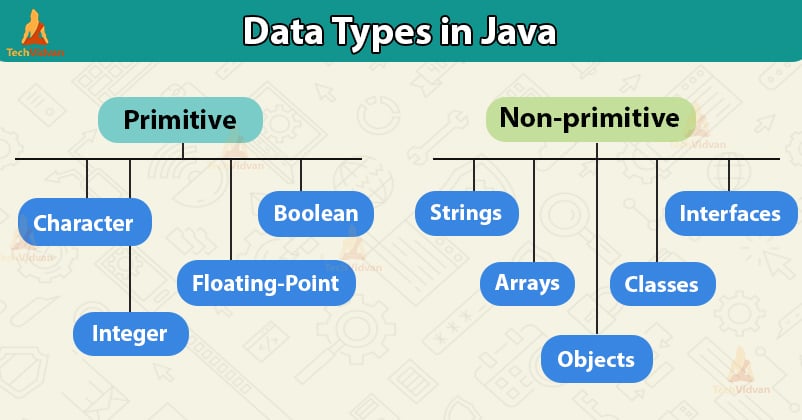
Java data types are divided into:
- Primitive types: Basic, efficient types stored directly in memory.
- Reference types: For complex data like objects (e.g., String—we’ll cover later).
Here, we focus on five key primitive data types: int, float, double, char, and boolean.


Key Primitive Data Types
| Data Type | Memory Size | Default Value | Range / Description | Common Use Cases |
|---|---|---|---|---|
| int | 32 bits (4 bytes) | 0 | -2³¹ to 2³¹-1 (-2,147,483,648 to 2,147,483,647) | Whole numbers: age, count, scores |
| float | 32 bits (4 bytes) | 0.0f | Approx. ±3.4 × 10³⁸ (6-7 decimal precision) | Decimal values needing less memory (e.g., graphics) |
| double | 64 bits (8 bytes) | 0.0 | Approx. ±1.7 × 10³⁰⁸ (15-16 decimal precision) | Precise decimals: salary, scientific calculations |
| char | 16 bits (2 bytes) | ” (null) | 0 to 65,535 (Unicode characters) | Single characters: ‘A’, ‘5’, ‘@’ |
| boolean | ~1 bit (implementation varies) | false | Only true or false | Flags: isActive, hasPermission |
Notes:
- Use int for most integers and double for most decimals (better precision, default for floating-point literals).
- float literals need an f suffix (e.g., 3.14f).
- char uses single quotes: ‘A’.
- There are other primitives like byte (8 bits), short (16 bits), and long (64 bits) for integers, but int is the default choice.
Declaring Variables in Java
Syntax:
dataType variableName;                  // Declaration only
dataType variableName = value;          // Declaration + Initialization
Rules for Variable Names:
- Must start with a letter, underscore _, or dollar $.
- Can contain letters, digits, _, or $.
- Case-sensitive (age ≠ Age).
- No spaces or special characters.
- Use meaningful names (camelCase convention: studentAge).
Examples:
public class VariablesDemo {
    public static void main(String[] args) {
        // Declarations
        int age;
        double height = 5.11;      // Initialized directly
        float weight = 70.5f;      // 'f' suffix required for float
        char grade = 'B';          // Single quotes
        boolean isPassed = true;

        // Multiple variables in one line
        int x = 10, y = 20, z = 30;

        // Assign value later
        age = 22;

        // Printing values
        System.out.println("Age: " + age);
        System.out.println("Height: " + height + " feet");
        System.out.println("Weight: " + weight + " kg");
        System.out.println("Grade: " + grade);
        System.out.println("Passed? " + isPassed);
    }
}
Important Rules:
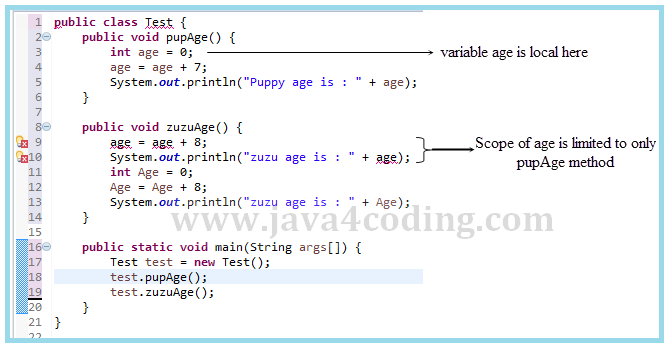
- Local variables (inside methods like main) must be initialized before use, or the code won’t compile.
- Use final for constants: final double PI = 3.14159; (value can’t change).
- Choose appropriate types to save memory and avoid overflow errors.
Practice Tip: Create a new Java class in your IDE. Declare variables for your name (use String later), age (int), GPA (double), initial (char), and whether you’re enrolled (boolean). Print a message like “My age is 20 and GPA is 3.8”.